Home / Guides / Connectivity & power
WiFi 7 vs WiFi 6E Laptop: What Actually Changes
Wi-Fi 7 vs Wi-Fi 6E in a laptop: 320 MHz channels, 4K QAM, Multi-Link Operation, router and Windows requirements, and 6 GHz rules explained.
The short answer
When you compare a WiFi 7 vs WiFi 6E laptop, the difference is in the wireless adapter and in how much your router and operating system let it do. Wi-Fi 7 (IEEE 802.11be) adds wider 320 MHz channels in the 6 GHz band, a denser 4K QAM modulation, and Multi-Link Operation. Wi-Fi 6E is Wi-Fi 6 extended into the 6 GHz band, with channels up to 160 MHz and 1024 QAM.
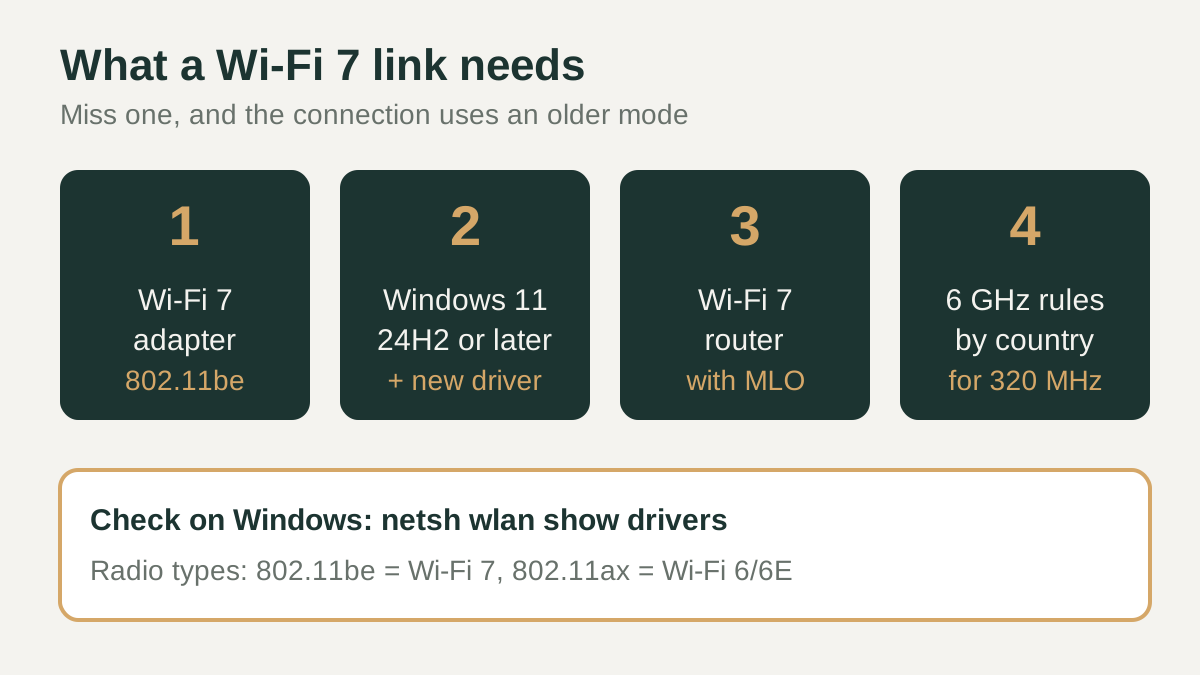
A Wi-Fi 7 laptop only uses those new features when it connects to a Wi-Fi 7 router, runs a supporting version of Windows with a current driver, and is located in a country that permits the relevant 6 GHz channels. If any of those pieces is missing, the connection falls back to what the weakest link supports.
What Wi-Fi 7 adds over Wi-Fi 6E
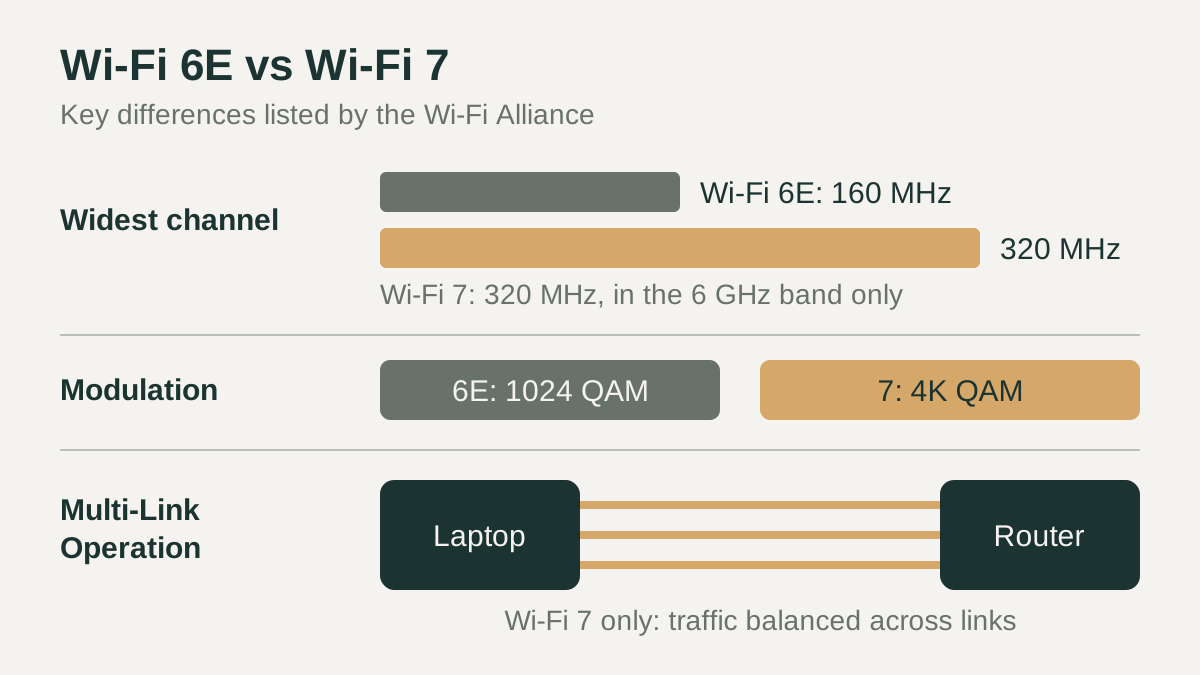
The Wi-Fi Alliance describes three headline changes. First, 320 MHz channels are available in the 6 GHz band, which the Alliance says provide twice the throughput of Wi-Fi 6, whose wider channels top out at 160 MHz. Second, 4K QAM achieves, in the Alliance's words, 20 percent higher transmission rates than the 1024 QAM used by Wi-Fi 6. Third, Multi-Link Operation (MLO) supports more efficient load balancing of traffic among links, so traffic can be spread across more than one link between laptop and router.
The Alliance also lists smaller efficiency features, such as 512 Compressed Block Ack and the ability to assign multiple resource units to a single device. Wi-Fi 7 works across the 2.4 GHz, 5 GHz and 6 GHz bands, so it is not only a 6 GHz technology.
| Feature | Wi-Fi 6E laptop | Wi-Fi 7 laptop |
|---|---|---|
| Standard | 802.11ax in 6 GHz | 802.11be |
| Widest channel | 160 MHz | 320 MHz, in the 6 GHz band only |
| Modulation | 1024 QAM | 4K (4096) QAM |
| Multi-Link Operation | Not part of Wi-Fi 6E | Yes, needs a router with MLO |
| Windows support | Windows 11 with 6 GHz support | Windows 11, version 24H2 or later |
Does a Wi-Fi 7 laptop help without a Wi-Fi 7 router?
Microsoft's guidance for Wi-Fi in Windows is that both the wireless adapter and the router must support a Wi-Fi technology before you can use it. A Wi-Fi 7 laptop paired with a Wi-Fi 6E router therefore connects as Wi-Fi 6E, and with a Wi-Fi 6 router it connects as Wi-Fi 6. The 320 MHz channels, 4K QAM and Multi-Link Operation stay unused until the router offers them too.
That does not make a Wi-Fi 7 adapter pointless. If you expect to replace your router during the life of the laptop, buying the newer adapter now keeps that path open. If your router will stay in place for years, the practical gap between the two laptops is much smaller than the spec sheet suggests.
6 GHz availability and Windows requirements
Both standards rely on the 6 GHz band for their widest channels, and that band is regulated country by country. The Wi-Fi Alliance's regulation map lists the United States, Canada and South Korea among countries that adopted the full 5925-7125 MHz range, while many others, including the United Kingdom, Japan and much of Europe, adopted only 5925/5945-6425 MHz. Intel notes that 6 GHz operation depends on country-specific spectrum allocation and regional regulatory approvals, so check your own country's rules.
On the software side, Microsoft states that Wi-Fi 7 is available starting with Windows 11, version 24H2, and that Wi-Fi 7 Enterprise is not currently supported. Intel's driver page repeats that its Wi-Fi 7 features start with Windows 11 24H2 and that usage of the 6 GHz band relies on Windows 11 support. Keep both Windows and the wireless driver up to date.
How to read a laptop's wireless spec line
A spec sheet line such as "Wi-Fi 7, 2x2, Bluetooth 5.4" names the standard, the number of antenna streams and the Bluetooth version. Many listings also name the adapter. Intel's spec page for its Wi-Fi 7 BE200 module, for example, lists 2.4, 5 and 6 GHz bands, 2x2 streams, a 320 MHz channel width, a maximum speed of 5.8 Gbps and Bluetooth 5.4. That maximum is a link rate under ideal conditions, not a download speed you should expect.
On a laptop you already own, Microsoft suggests running netsh wlan show drivers in Command Prompt or Terminal. Under "Radio types supported", 802.11be indicates Wi-Fi 7 and 802.11ax indicates Wi-Fi 6 or 6E. The same output lists whether WPA3 Personal and WPA3 Enterprise are supported.
Checklist before you buy
Use these checks to decide whether the newer adapter matters for your situation. They focus on conditions you can confirm from official spec sheets and your own network rather than on headline speed figures. If most of the answers point to an older router or a region with limited 6 GHz access, a Wi-Fi 6E laptop may serve you just as well for now.
- Confirm the exact adapter and standard on the manufacturer's spec sheet, not only a marketing badge.
- Check whether your current router, or the one you plan to buy, supports Wi-Fi 7 and Multi-Link Operation.
- Look up which 6 GHz channels your country permits before counting on 320 MHz operation.
- Make sure the laptop ships with, or can run, Windows 11 version 24H2 or later.
- After setup, update the wireless driver and run netsh wlan show drivers to verify 802.11be support.
- If you rely on a corporate WPA3 Enterprise network, ask IT whether Wi-Fi 7 is supported there yet.