Home / Guides / Connectivity & power
USB-C Laptop Charging Wattage: How Many Watts Your Laptop Needs
How USB-C laptop charging wattage works: matching charger watts, what a lower-wattage charger does, USB PD levels up to 240W, and why cable ratings matter.
Can any USB-C charger charge my laptop?
USB-C laptop charging wattage is the number that decides whether a charger powers your laptop well, slowly, or barely at all. The short answer: laptops that charge over USB-C typically rely on the USB Power Delivery (USB PD) standard, and a USB PD charger can usually supply them, but the charger should deliver at least the wattage the laptop maker recommends. A USB-C plug that fits the port does not by itself mean the charger supplies enough power.
Apple states this plainly for its Mac laptops: you can charge a Mac laptop with any USB-C power adapter or display that supports USB PD, and Apple advises using one that provides at least the minimum wattage of the adapter recommended for your model. Other manufacturers give similar advice, so the laptop's own recommended adapter wattage is the figure to compare against.
What wattage does my laptop need?
Start with the adapter that shipped with the laptop or the wattage listed in its manual or support page. That figure reflects what the configuration was designed around. Apple's recommended adapters for its laptops range from small adapters for lighter models up to a 140W USB-C Power Adapter for the 16-inch MacBook Pro (2021 or later), which shows how widely needs vary even within one brand.
You can also check what the laptop is actually receiving. On a Mac, hold Option, open the Apple menu, choose System Information, select Power, and look under AC Charger Information. On Dell laptops, the BIOS Overview screen lists the AC adapter, and Dell notes that an Unknown or wrong wattage reading there can point to an incompatible charger. Dell advises using a charger that matches the laptop's wattage requirements as listed in its manual.
What happens with a lower-wattage charger?
A charger below the recommended wattage usually still negotiates power over USB PD, but it supplies less than the laptop can use. Apple says that a lower-wattage adapter can charge a Mac, yet recommends matching the minimum wattage for proper charging, and on macOS Tahoe 26.4 or later a Slow Charger message appears when the charging solution is too low for the model. Dell says a low-wattage or incompatible charger may cause slow or poor charging.
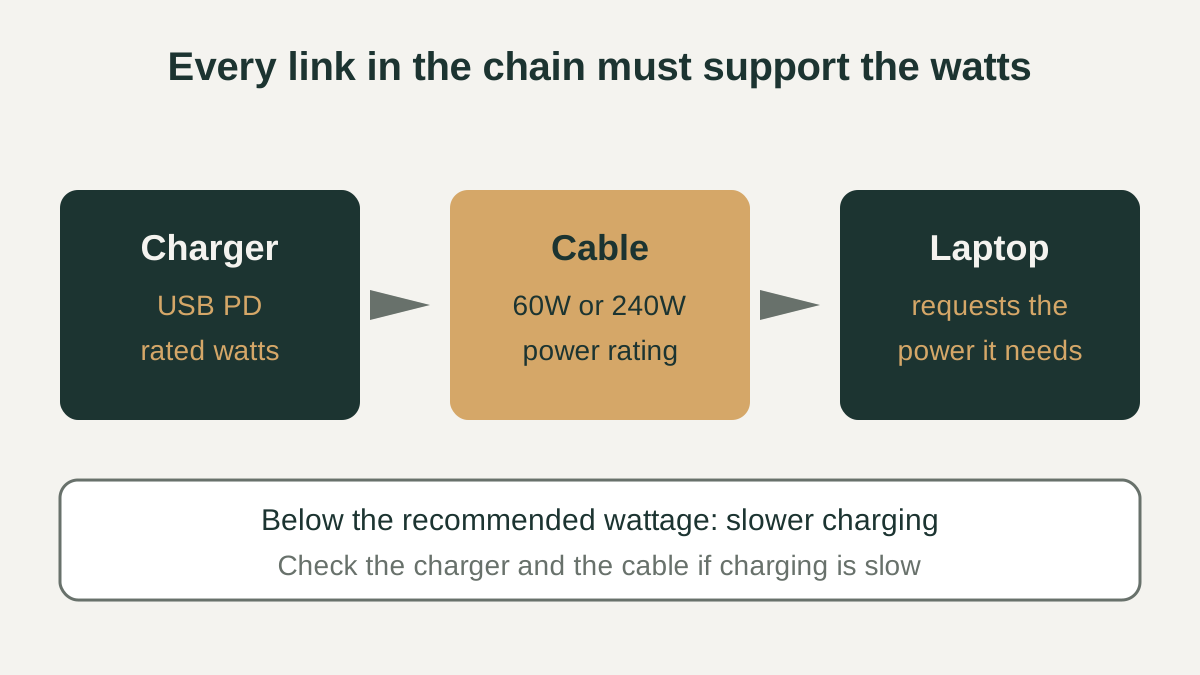
A higher-wattage USB PD charger is not harmful in this model, because the laptop requests only the power it needs. Apple also notes that connecting chargers to more than one port does not charge a Mac faster; the Mac uses the single source that provides the most power.
| Charger situation | Typical outcome | Where this comes from |
|---|---|---|
| USB PD charger at or above the recommended wattage | Charges normally; the laptop draws only what it needs | Apple Mac power adapter guidance |
| USB PD charger below the recommended wattage | Slower charging; may show a slow charger warning | Apple charging guidance, Dell troubleshooting |
| Charger the laptop reports as unknown or wrong wattage | Poor or slow charging; try a matching adapter | Dell AC adapter troubleshooting |
| Two chargers on two ports at once | No speed gain; one source is used | Apple charging guidance |
USB PD power levels, including EPR 240W
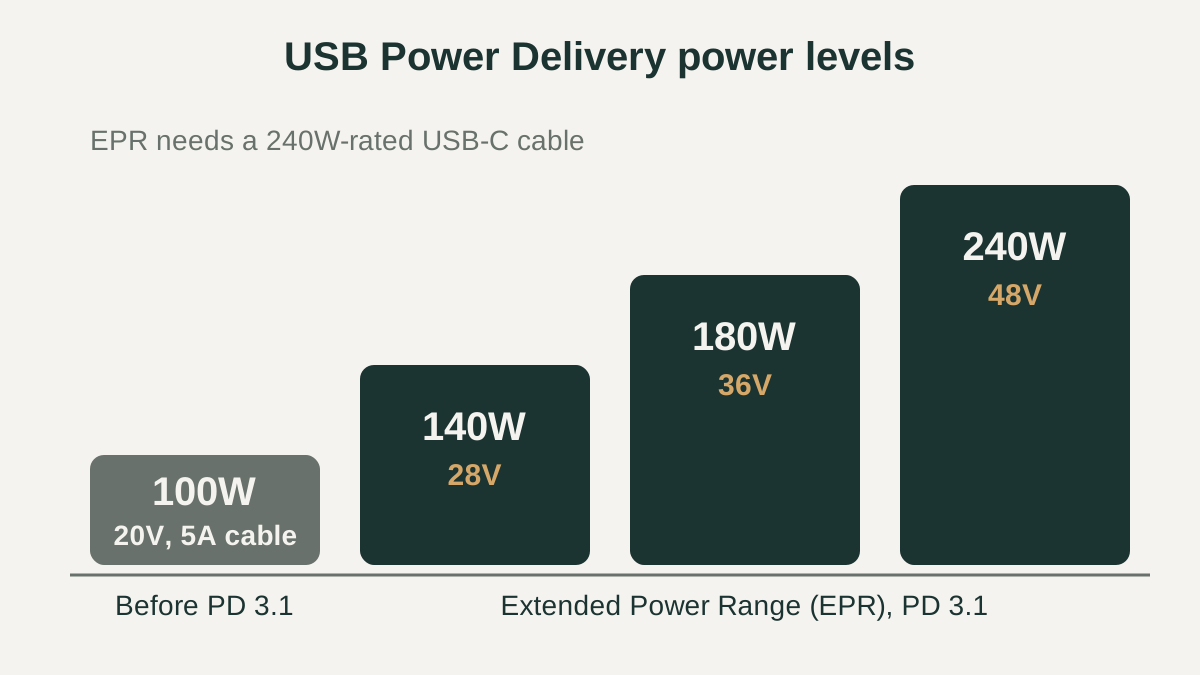
According to the USB Implementers Forum (USB-IF), USB PD was limited to 100W before Revision 3.1, using 20V over USB Type-C cables rated at 5A. USB PD Revision 3.1, announced in 2021, raised the ceiling to 240W over a full-featured USB Type-C cable and connector. This higher tier is known as the Extended Power Range (EPR).
EPR adds fixed voltages of 28V, 36V and 48V, which support 140W, 180W and 240W respectively. USB-IF also describes an adjustable voltage supply mode that lets the laptop request intermediate voltages from 15V up to the charger's maximum fixed voltage. For a buyer, this means a charger's label wattage only helps if the laptop can request that level and the cable can carry it.
Do USB-C cables matter for charging wattage?
Yes. The cable sits between charger and laptop, and its rating can cap what reaches the laptop. USB-IF's certified cable power rating logos mark USB-C cables as supporting either 60W or 240W of power, as defined by USB PD 3.1. At 20V, 60W works out to 3A, while the older 100W ceiling relied on cables rated at 5A.
In practice, a laptop that needs more than 60W should be paired with a cable rated for higher power, and an EPR charger above 100W needs a cable rated for 240W, which USB Type-C Release 2.1 defines. Apple notes that if a Mac is not charging as expected, the power adapter or the charge cable could be the cause, so check both before assuming the laptop is at fault.
Checklist before you buy
Use these checks before buying a USB-C charger or cable for a laptop. They rely on numbers printed on the adapter, the cable packaging, and the laptop maker's support pages rather than on marketing claims, so you can compare options on equal terms. If any figure is missing from a listing, treat the product as unverified until the maker's own documentation confirms it.
- Find the laptop's recommended adapter wattage in its manual, support page, or original adapter label.
- Confirm the charger supports USB Power Delivery and lists at least that wattage on its label.
- If the laptop needs more than 100W, check that both laptop and charger support USB PD EPR levels (140W, 180W or 240W).
- Choose a cable whose rating covers the wattage: a USB-IF 60W or 240W power rating logo is a clear signal.
- After plugging in, check the reported charger wattage in System Information (Mac) or the BIOS (Dell).
- If a slow charger warning appears, connect the adapter directly to the laptop rather than through a dock or hub.