Home / Guides / Upgrades & longevity
Can You Upgrade Laptop RAM? Soldered vs SODIMM vs LPCAMM2
Whether you can upgrade laptop RAM depends on soldered, SODIMM or LPCAMM2 memory. How to check a model's spec sheet and what to confirm before buying.
The short answer
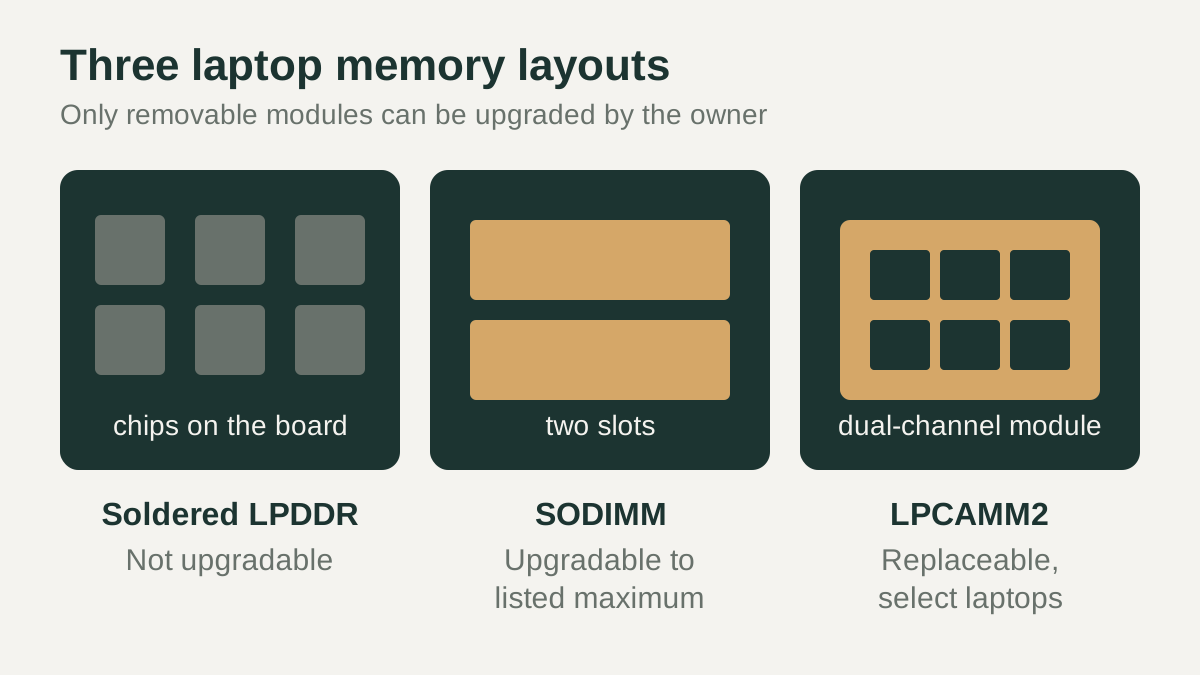
Can you upgrade laptop RAM? Only if the memory is on a removable module. Laptops use one of three layouts: memory chips soldered directly to the system board, which cannot be upgraded by the owner; SODIMM slots that accept standard removable sticks; or a newer compression-attached module such as LPCAMM2, which is replaceable. Some models mix soldered memory with one open slot, so only part of the total can change.
The layout is fixed by the design of each model, so the answer comes from that model's official spec sheet or service manual rather than from the brand or the size of the laptop. Two laptops from the same product family can differ, so check the configuration you plan to buy.
Soldered, SODIMM and LPCAMM2 explained
Soldered (onboard) memory is usually LPDDR, low-power memory mounted on the board. Lenovo's PSREF sheet for the ThinkPad X1 Carbon Gen 12, for example, lists 16GB, 32GB or 64GB of soldered memory, "not upgradable", with "no slots". SODIMMs are the long-standing removable laptop sticks; the ThinkPad T14 Gen 5 (Intel) sheet lists two DDR5 SODIMM slots and up to 64GB.
LPCAMM2 packages dual-channel LPDDR5/5X memory on a thin, replaceable board that is pressed onto a connector. Crucial describes it as a JEDEC standard designed to be replaceable. Lenovo lists the ThinkPad P1 Gen 7 with one LPCAMM2 connector, dual-channel, and up to 64GB, upgradable. Crucial notes that its LPCAMM2 modules only work with select laptops, so support is model-specific.
| Memory layout | Can the owner upgrade it? | Example spec-sheet wording |
|---|---|---|
| Soldered LPDDR | No | "Memory soldered to systemboard, no slots" (ThinkPad X1 Carbon Gen 12) |
| SODIMM slots | Yes, within the listed maximum | "Two DDR5 SODIMM slots, dual-channel capable" (ThinkPad T14 Gen 5 Intel) |
| LPCAMM2 module | Yes, by replacing the module | "One LPCAMM2 connector, dual-channel" (ThinkPad P1 Gen 7) |
| Soldered plus one slot | Partly, the slot only | Onboard memory plus a removable module |
How to check a specific laptop
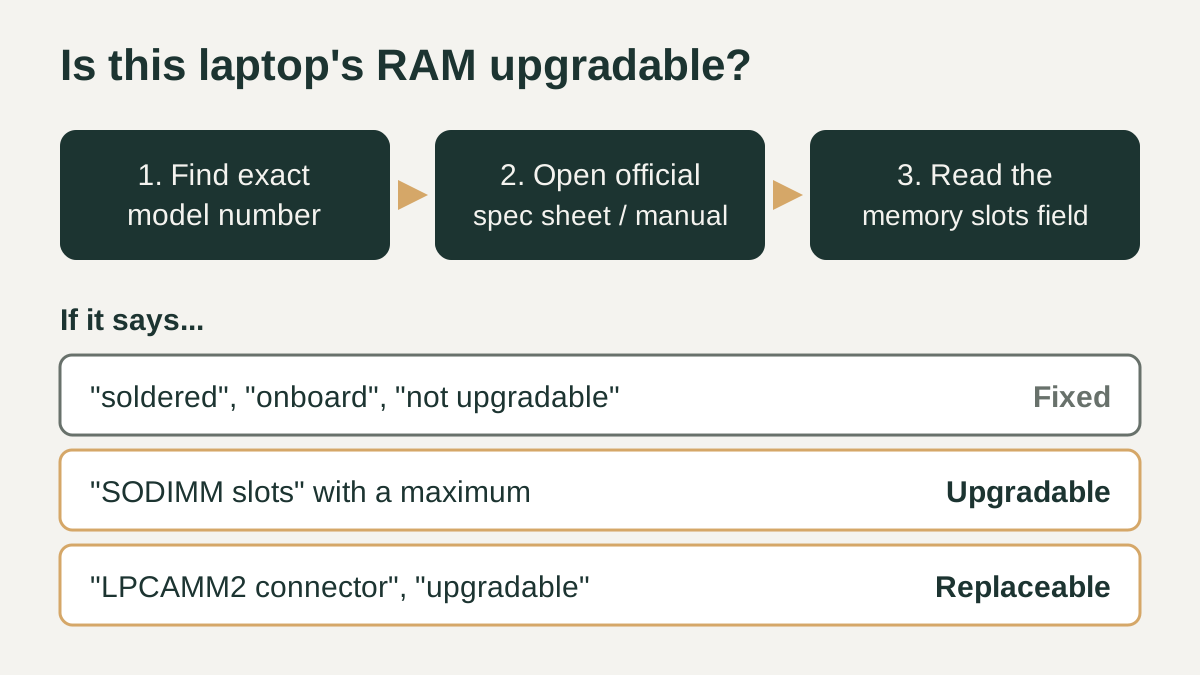
Start with the exact model or machine type number, because one product name can cover several configurations. Then open the manufacturer's official specification document. Lenovo publishes PSREF sheets with "Max Memory" and "Memory Slots" fields. Dell publishes an owner's manual for each model; the Latitude 5450 manual lists two SODIMM slots, DDR5, 8 GB to 64 GB total, and 8, 16 or 32 GB per slot.
Read the wording closely. Phrases such as "soldered", "onboard", "integrated" or "not upgradable" mean the memory is fixed. "SODIMM slots" or "upgradable" with a stated maximum means you can add or replace modules. Memory makers' compatibility lookups, such as Crucial's, can serve as a second check, but the manufacturer's document should decide.
Why thin laptops often use soldered LPDDR
Removable sockets take up board space and height that thin designs try to save. Crucial's LPCAMM article sums up the trade-off: LPDDR is compact but has limited upgradeability because it is soldered to the motherboard, while SODIMMs are detachable but take more room. Crucial and Micron present LPCAMM2 as an attempt to offer low-power memory in a replaceable form.
Speed is a separate question from upgradeability. Lenovo's X1 Carbon Gen 12 sheet lists LPDDR5X-6400, noting the installed chips are rated 7500 but run at 6400 due to a platform limitation, while the T14 Gen 5 SODIMM version lists DDR5-5600. The practical consequence for buyers is simple: on a soldered design, the amount of RAM you choose at checkout is the amount you keep for the life of the laptop.
Dual-channel considerations
Laptop processors generally read memory over more than one channel, and how you populate slots matters. Dell's Latitude 5450 manual labels configurations explicitly: 16 GB as 2 x 8 GB is dual-channel, while 16 GB as a single 16 GB module is single-channel. If a two-slot laptop ships with one module, adding a matching second module can move it to dual-channel operation.
Soldered and LPCAMM2 layouts handle channels internally. Lenovo's X1 Carbon Gen 12 sheet lists its soldered memory as 8-channel, and the P1 Gen 7 sheet lists its single LPCAMM2 connector as dual-channel. Before upgrading a SODIMM laptop, check which configurations the manual lists and match capacity and speed across both slots.
Checklist before you buy
If you may want more memory later, a few minutes with the official documents can prevent a costly surprise. These checks apply to any brand and rely only on information that manufacturers publish for each model, so they work for new and older laptops alike. If the spec sheet is unclear, the manufacturer's support line or service manual can confirm the memory layout before you commit.
- Find the exact model or machine type number of the configuration you plan to buy.
- Open the official spec sheet or owner's manual and read the memory slots field.
- Treat "soldered", "onboard" or "not upgradable" as final, and buy the capacity you will need.
- For SODIMM or LPCAMM2 models, note the listed maximum memory and supported speed.
- Check whether one module or a dual-channel pair is installed, and what the manual lists as dual-channel.
- Confirm in the service manual whether opening the case is a user-serviceable step for that model.